The Windows 8.1 preview is here, giving us a first-hand glimpse at the fruits of Microsoft’s newfound rapid-release religion. Remolding an operating system in eight scant months is a tall task indeed, and while Windows 8.1 is still far from perfect, Microsoft managed to craft a fairly capable re imagining of its new-look OS in the short time since Windows 8 debuted last October.
Steve Ballmer said it well: Windows 8.1 refines the blend, making the core modern UI experience far less jarring than before. Don’t dig all the Live Tiles? Windows 8.1 even tosses several sizable bones to desktop aficionados.
Here, folks, are the five most enticing reasons to upgrade to Windows 8.1 when the final version becomes available. Microsoft has said the official release is slated for 2013, but hasn't announced a firm release date. If you’re feeling adventurous enough to run beta software preferably on a secondary computer, for precaution's sake—you can install the Windows 8.1 preview today, but be sure to back up your data first.
1. A better desktop experience
Just look at all those desktop-friendly features!
Hey, this is PCWorld, not TabletWorld, and while the times they are a-changing, the vast majority of computers found in the wild don’t rock the touchscreens that really take advantage of the modern UI. Microsoft seemed to forget that point with the original Windows 8 release, but fortunately the Windows 8.1 preview packs a bevy of improvements that make using it much more palatable to keyboard jockeys.
After some mild tweaking, you won’t have to jump through hoops to largely eliminate the modern UI from your computing life. Windows 8.1 reintroduces boot-to-desktop, and if you pair that with the ability to configure the returned Start button to jump to the Start menu-esque All Apps screen, you may rarely, if ever, see a Live Tile.
Assuming nothing incredibly major changes between now and the time the final release appears, Windows 8.1 still isn’t compelling enough to coax staunch Windows 7 lovers to upgrade, but it does make the transition much easier if you do decide to switch to Microsoft’s modern vision.
2. More seamless overall 
Speaking of transitions, one of the major complaints about Windows 8 was the disjointed way that the desktop and the modern UI interacted. All too often, they felt like warring, totally separate universes, and the OS was all too eager to rip you out of one to dump you unceremoniously in the other—a disorienting (and frustrating) experience.
Windows 8.1 smooths that feeling over quite a bit. The walls are definitely still there, and you’ll occasionally find yourself whisked from one UI to the other, but overall, the experience is far less intrusive. With the addition of the revamped Start button, the ability to carry your desktop background over to the Start screen, and the fuller-fledged modern PC Settings, the Windows 8.1 preview gives you a greater feeling of control over the UI. Now, if Microsoft would only introduce a modern-style file explorer app…
3. Versatile app snapping

Two Internet Explorer windows, each Snapped to fill half the screen.
Another big plus in the Windows 8.1 preview is its more-flexible Snap function, which allows you to have multiple modern-style apps open at once. In Windows 8 vanilla, you’re limited to having two apps open simultaneously: One fills 75 percent of the screen, while the other is relegated to the last quarter. That seriously cramps Snap’s usefulness.
Windows 8.1 shatters its predecessor’s artificial barriers. Depending on your display’s resolution, you can have as many as four apps snapped on a single screen, and you can now dynamically alter the size of snapped windows. Being able to dedicate half the screen each to two apps seriously boosts Windows 8.1’s productivity chops.
The Snap changes may sound minor, but they add up to a huge usability improvement—especially when paired with the newfound ability to open the modern version of Internet Explorer 11 in multiple windows at once.
4. Cohesive search results
Windows 8’s Search charm was pretty helpful, but Windows 8.1’s Smart Search blows it out of the water. Rather than separating search results into distinct Apps, Settings, and Files categories, Windows 8.1 pools everything into a single cohesive search results page, complete with results from other apps, including SkyDrive, Bing Web search, and the Video and Music apps.

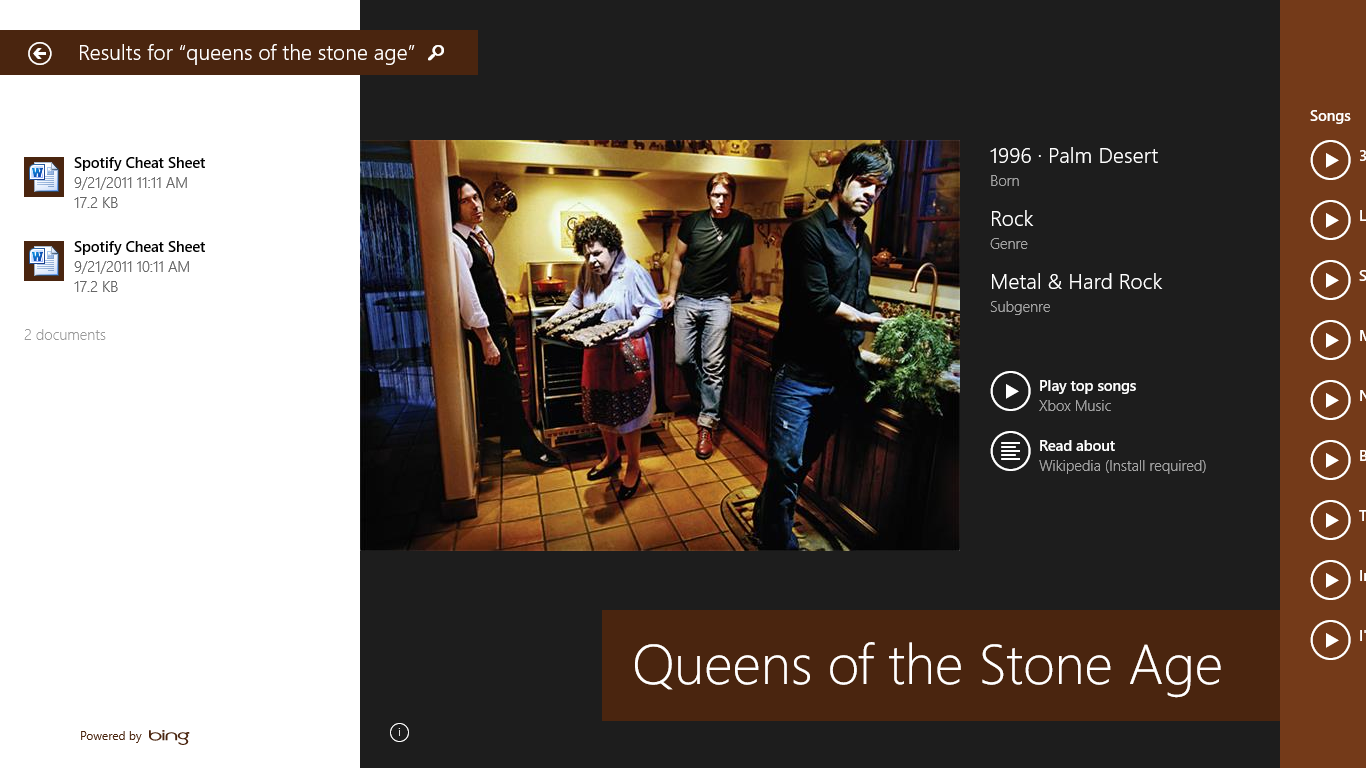
Windows 8.1’s Smart Search pools local and Web-sourced data into one collection of search results, like this aggregate on Queens of the Stone Age
That makes Windows 8.1’s search incredibly versatile and incredibly helpful. Searching for the band Queens of the Stone Age, for example, popped up an eye-catching picture of the group, a couple of documents where I’d mentioned them, biographical info, the ability to stream their songs using the Music app, Bing search results, and recommendations for a couple of apps that could provide more info about the group.

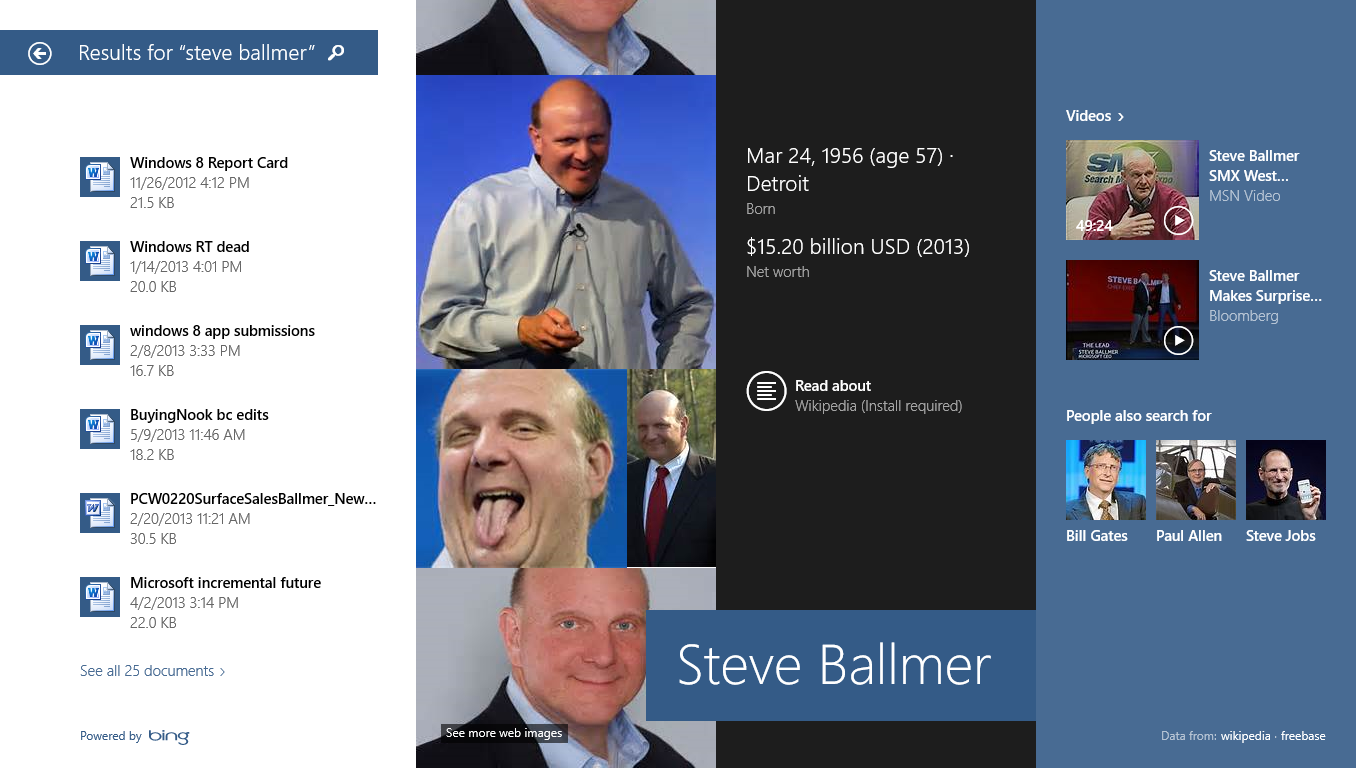
Windows Smart Search also scooped up a barrel o’ data on Microsoft CEO Steve Ballmer with impressive ease.
Searching for Microsoft CEO Steve Ballmer, on the other hand, also revealed some local documents, but his results included numerous videos, related search topics, and a lot more.
If Microsoft had added only Smart Search to Windows 8.1, it would’ve been enough to convince me to install the update. Yes, it’s that good.
5. New features in every corner

Windows 8.1 includes support for 3D printers. How cool is that?
The Windows 8.1 preview is also jam-packed with all kinds of hidden features. From Miracast streaming to 3D printer support to Photosynth-style panoramas in the Camera app to the veritable cornucopia of new features buried in the revamped PC Settings menu, there’s something new and interesting in every nook and cranny. (And that’s not even counting the deep bench of new and updated native apps, like the vastly improved Windows Store.)
You could spend several days discovering all the tweaks Microsoft stuffed into the Windows 8.1 preview. Few of them can be classified as all-star additions, but all are welcome extras nonetheless—and it’s kind of exciting never knowing what you’ll find when you dive into an unexplored corner of the OS.
A must-have for Windows 8 adoptees
Now, don’t get me wrong. Windows 8.1 won’t do anything to soothe your concerns if you hate the very premise of the core Windows 8 experience. The Live Tiles and modern UI aren’t going anywhere. (You can read our in-depth impressions of Windows 8.1 here.)
But with the Windows 8.1 preview, Microsoft has shown that it’s willing to compromise a bit on its post-PC push to nudge along the desktop diehards. The raft of changes—refinements—in Windows 8.1 soften some of the bumps in the migration path for newcomers. And if you’re already aboard the Windows 8 bandwagon, there’s no reason not to upgrade to Windows 8.1 whenever it becomes officially available.




0 comments: